
By the Royal AD Tek technical team. Reference data last reviewed: 19 November 2026. All figures are reference values; confirm the final configuration, payload and flight plan for your project before ordering.
A drone flying LED screen mesh is a lightweight, open-mesh LED display that hangs beneath a suitable heavy-lift drone, turning the sky into a moving video surface for aerial advertising, concerts, festivals and brand events. This guide explains how Royal AD Tek's P25 flying LED mesh screen works: its 25 mm pixel pitch, verified specifications, size and weight options, battery and runtime reference data, brightness management, installation steps and drone-connection hardware. It also states the limits plainly, because payload, weather, flight permits and insurance decide whether an aerial project is feasible.
Quick answers
- What it is: a flexible LED mesh display suspended under a heavy-lift drone.
- Pixel pitch: 25 mm, which gives 1,600 dots/m².
- Sizes: standard 1 × 4 m to 5 × 12.5 m; custom P25 screens up to 12.5 m high with unlimited width, subject to drone payload and project design.
- Weight: 0.75 kg/m² for the screen body only.
- Power: 12V battery packs, either built-in 21700 (9Ah) or external 18650 (18Ah); reference runtime is about 60 minutes (built-in) or about 80 minutes (external).
- Brightness: the modules reach up to 2,800 cd/m², but flight brightness is set far lower.
- Responsibility: drone selection, manufacturer terms, flight permits and insurance remain with the operator.
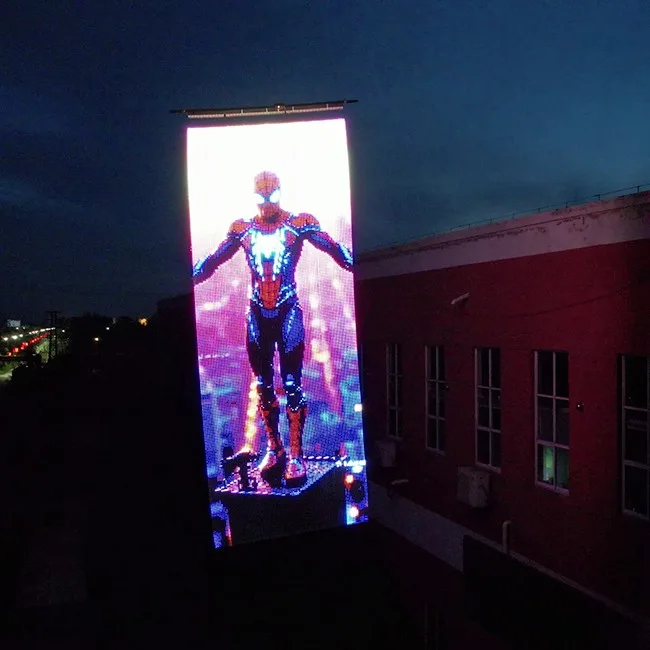
Royal AD Tek P25 drone flying LED screen mesh.
1. What Is a Drone Flying LED Screen Mesh?
A drone flying LED screen mesh is an LED display built as a flexible net of LED strips rather than a rigid cabinet. The open structure keeps the weight low and lets air pass through the screen. A heavy-lift drone carries the whole system, which includes the screen, battery packs, controller, ropes, rods and clamps.
This is different from a conventional drone light show, where hundreds of small drones each act as one light point. A flying screen uses one drone (or a small group) to carry a real video surface that can show logos, text and moving images. The two formats suit different goals; our comparison article on flying LED displays versus drone light shows explains when to choose which. For a shorter definition, see What Is a Drone Flying LED Mesh Screen?
2. How the P25 Flying LED Mesh Display Works
The P25 system has five working parts:
- LED mesh: SMD 3550 × 1 LEDs on flexible strips, with the sub-controller box built into the screen structure.
- Media player and control: a NovaStar TB10 Plus player with Wi-Fi app management sends content to the screen.
- Power: 12V lithium battery packs feed a DC-DC step-down module in the power and signal control box, which supplies 5V to the screen. The battery pack is 12V; the screen itself runs at 5V.
- Suspension: lifting ropes attach to a 1 m connection rod, which is fixed to the drone's landing gear tube with swivel clamps.
- Stabilisation: one 1 m weight rod per metre of screen width runs along the bottom edge so the screen hangs straight.
Signal and power are carried through the controller bar: the player's LAN port connects to the screen's left-side LAN port, and Ethernet cables link neighbouring enclosures.
3. Why 25 mm Pixel Pitch Suits Aerial Viewing
Pixel pitch is the distance between neighbouring LEDs. At 25 mm, a P25 screen has 40 pixels per metre in each direction, or 1,600 dots per square metre. A 4 × 8 m screen is therefore 160 × 320 pixels, and a 5 × 10 m screen is 200 × 400 pixels.
That is coarse compared with a stage LED wall, and that is deliberate. A flying screen is normally watched from event-scale distances, where finer pixels would add weight and power draw without a visible gain. A common rule of thumb in LED design is about one metre of viewing distance for every millimetre of pitch, which points to roughly 25 m or more for P25. This is a general guideline, not a product rating. Confirm the viewing distance and audience position in your project review. If a project needs more image detail, Royal AD Tek can discuss finer-pitch options.
Design content for the screen's native resolution (for example 160 × 320 for a 4 × 8 m screen) so that text and logos stay legible.
4. Full Technical Specification Table
| Specification | P25 value |
|---|---|
| Pixel pitch | 25 mm |
| Pixel density | 1,600 dots/m² |
| LED type | SMD 3550 × 1 |
| Grayscale | 8-bit or 16-bit (16-bit recommended; both use the same power consumption) |
| Module brightness | Up to 2,800 cd/m² at 100% (maximum module rating, not the recommended flight setting) |
| Contrast ratio | 1000:1 |
| Transparency | 40% (measured) |
| Operating temperature | −20 °C to +45 °C (measured) |
| Wind test reference | Highest wind speed recorded in our tests: 6 m/s. This is a test value, not a safe-operation guarantee |
| Power consumption | Maximum 200 W/m²; average 120 W/m². Measured at 100% brightness on 220V AC through a DC power supply |
| Screen weight | 0.75 kg/m², screen body only |
| Voltage | 12V battery pack; 5V screen voltage through an internal DC-DC module |
| Battery options | Built-in 21700 12V 9Ah, or external 18650 12V 18Ah; BMS protected; UN38.3 certification stated for both |
| Charging | Built-in pack: 10A fast charger, about 2–3 hours. External 18Ah pack: about 4–5 hours |
| Ingress protection | IP65 |
| Control | NovaStar TB10 Plus / Wi-Fi app management |
| Drone clamps | Swivel clamps for 25–30 mm or 30–35 mm tube outer diameter; 200 kg static test per clamp (internal test) |
| In the package | 40 spare LEDs per screen, replacement video and installation manual |
| Warranty | 2 years for the screen; batteries, controller and media player are excluded |
The 200 kg clamp figure is a static component test. It is not a drone lifting rating and not flight certification.
5. Screen Size, Resolution and Weight
| Size (W × H) | Resolution | Total pixels | Screen weight | Weight rods + connection rod | Recommended lifting rope |
|---|---|---|---|---|---|
| 1 × 4 m | 40 × 160 | 6,400 | 3 kg | 1 + 1 | 5 m |
| 2 × 5 m | 80 × 200 | 16,000 | 7.5 kg | 2 + 1 | 7 m |
| 3 × 7 m | 120 × 280 | 33,600 | 15.75 kg | 3 + 1 | 9 m |
| 4 × 8 m | 160 × 320 | 51,200 | 24 kg | 4 + 1 | 10 m |
| 5 × 10 m | 200 × 400 | 80,000 | 37.5 kg | 5 + 1 | 12 m |
| 5 × 12.5 m | 200 × 500 | 100,000 | 46.8 kg | 5 + 1 | 13 m |
Weights are for the screen body only. Total pixels are width × height in pixels. Rope lengths are Royal AD Tek's recommended values from internal testing. 5 × 12.5 m is the largest standard P25 size; for taller screens see our P41.6 5 × 15 m flying LED screen.
6. Battery Options and Runtime Comparison
The standard configuration uses one battery pack per metre of screen width. Two options are available:
- Built-in: 21700 cells, 12V 9Ah, 0.5 kg per pack. Charges in about 2–3 hours with the 10A fast charger.
- External: 18650 cells, 12V 18Ah, 1 kg per pack, mounted on battery holders (clip and fixing screws, 0.3 kg per pack) along the top edge. Charges in about 4–5 hours and gives about 20 minutes more runtime at the same brightness.
| Size | Standard packs | Built-in: total weight / runtime | External: total weight / runtime |
|---|---|---|---|
| 1 × 4 m | 1 | 7 kg / about 60 min | 8.25 kg / about 80 min |
| 2 × 5 m | 2 | 15 kg / about 60 min | 17.5 kg / about 80 min |
| 3 × 7 m | 3 | 26.6 kg / about 60 min | 30.5 kg / about 80 min |
| 4 × 8 m | 4 | 38.3 kg / about 60 min | 43.5 kg / about 80 min |
| 5 × 10 m | 5 | 55.26 kg / about 60 min | 61.75 kg / about 80 min |
| 5 × 12.5 m | 5 | 64.63 kg / about 60 min | 71.13 kg / about 80 min |
Total weight includes the screen body, NovaStar TB10 Plus controller, battery packs, battery holders (clip and screws), connection rod, lifting ropes, clamps and weight rods. Runtime figures are reference values at the brightness set for each size, for example about 33% on a 4 × 8 m screen and about 28% on a 5 × 10 m screen. They are not universal guarantees: actual runtime varies with brightness, content, temperature, battery condition and configuration.
For long-hover projects, such as events using a tethered drone power system, Royal AD Tek can discuss fitting two 12V 18Ah packs per metre of width. Tell us your drone payload and target flight time first.
7. Brightness and Power Management
The 2,800 cd/m² figure is the maximum rating of the P25 module at 100% brightness. A flying screen cannot use it. Three limits apply in flight:
- Battery energy. The power figures above (200 W/m² maximum, 120 W/m² average) were measured at 100% brightness on 220V AC through a DC power supply. They are bench measurements, not flight consumption, but they show why brightness has to be managed when the screen runs from battery packs.
- Voltage drop. Voltage falls along the LED strips. If brightness is set too high, white at the bottom of a tall screen shifts to yellow and then red.
- Protection. The battery management system (BMS) limits overload and temperature.
For each size, brightness is set to the highest level at which white stays white at the bottom edge, while balancing voltage drop, overload protection and runtime. Taller screens need a lower setting. In our reference tests, a 4 × 8 m screen runs at about 33% brightness and a 5 × 10 m screen at about 28%.
Content matters too. Large white areas draw more power than dark scenes, so night-sky-friendly designs with dark backgrounds run longer. The screen is designed for evening and night shows; in our Shanghai summer tests, performance was best after about 18:30.
Do not set the screen brightness to 100%. Unauthorised changes to the recommended setting may damage the equipment, and the operator is responsible for any resulting loss or damage.
8. Integrated Quick-Connection Installation Kit
On earlier flying screens, each LED strip had to be plugged into a separate sub-controller connector. At P25 pitch that is about 40 connections per metre of screen width. In the integrated design, the sub-controller box is built into the screen structure and the LED strips are already attached to it.
What this changes on site:
- The strip-by-strip connection step is removed.
- In our internal installation test on a 4 × 8 m screen, a three-person crew finished about 40 minutes faster than with our previous design.
- No additional hanging rod is needed along the top edge on any screen size.
- Fewer exposed connection points are handled during transport.
Lower weight rods, ropes and rigging hardware are still part of the kit. Previous-generation screens remain supported by our after-sales service.
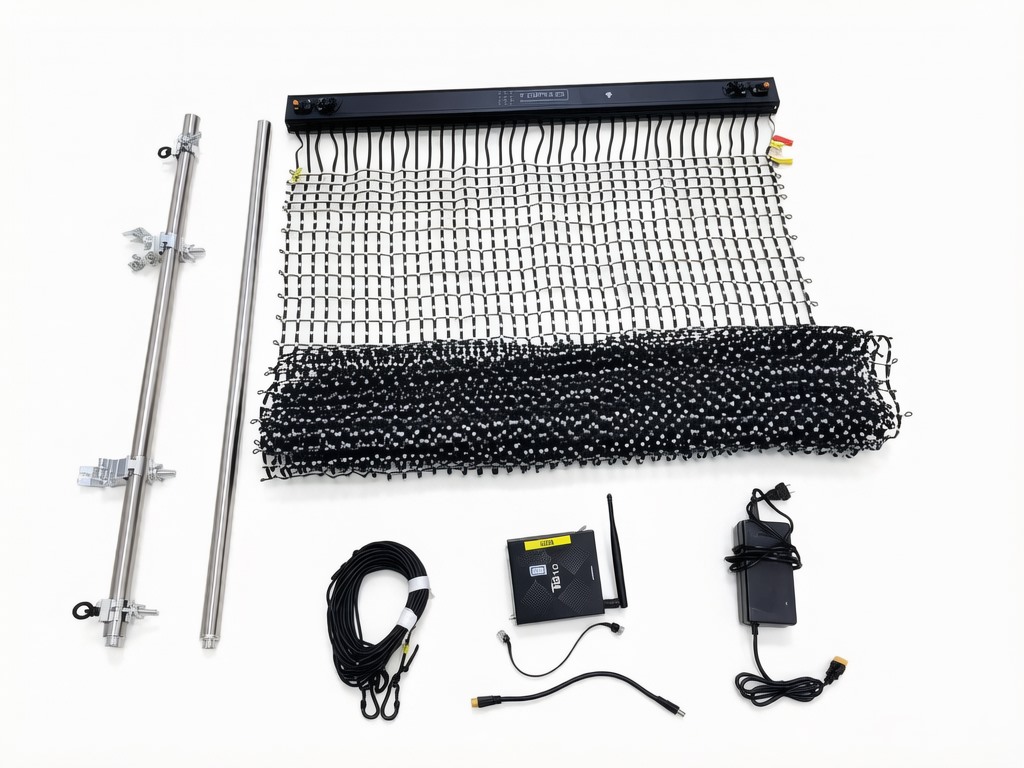
P25 flying LED screen kit with integrated controller, support hardware, cables and power pack.
9. Step-by-Step Assembly and Connection Guide
Quantities vary with screen size and battery option, so always follow the manual supplied with your kit. The workflow is:
- Prepare the screen on the ground. Lay the mesh flat on a clean surface and check the kit against the packing list.
- Join the sections. Fit the straight connectors in the upper and lower slots before joining two enclosures.
- Fit the bottom weight rods. Secure the 1 m rods evenly along the bottom edge with cable ties (one rod per metre of width).
- Mount the media player. Fix the bracket to the pre-installed positioning slider nuts with the thumb screws, then fix the player to the bracket.
- Connect power and signal. Connect the player power cable, then the player LAN port to the screen's left-side LAN port. Link enclosures with Ethernet cables.
- Connect the battery packs. Plug the packs into the power input ports as shown in the manual. With the external option, fit the packs on their holders.
- Attach the suspension hardware. Install each eyebolt in the offset central threaded hole of an intermediate single-slot connector, then fit the lifting ropes and buckle kits at the specified points.
- Test before flight. Check playback, power and signal on the ground at the approved brightness setting.
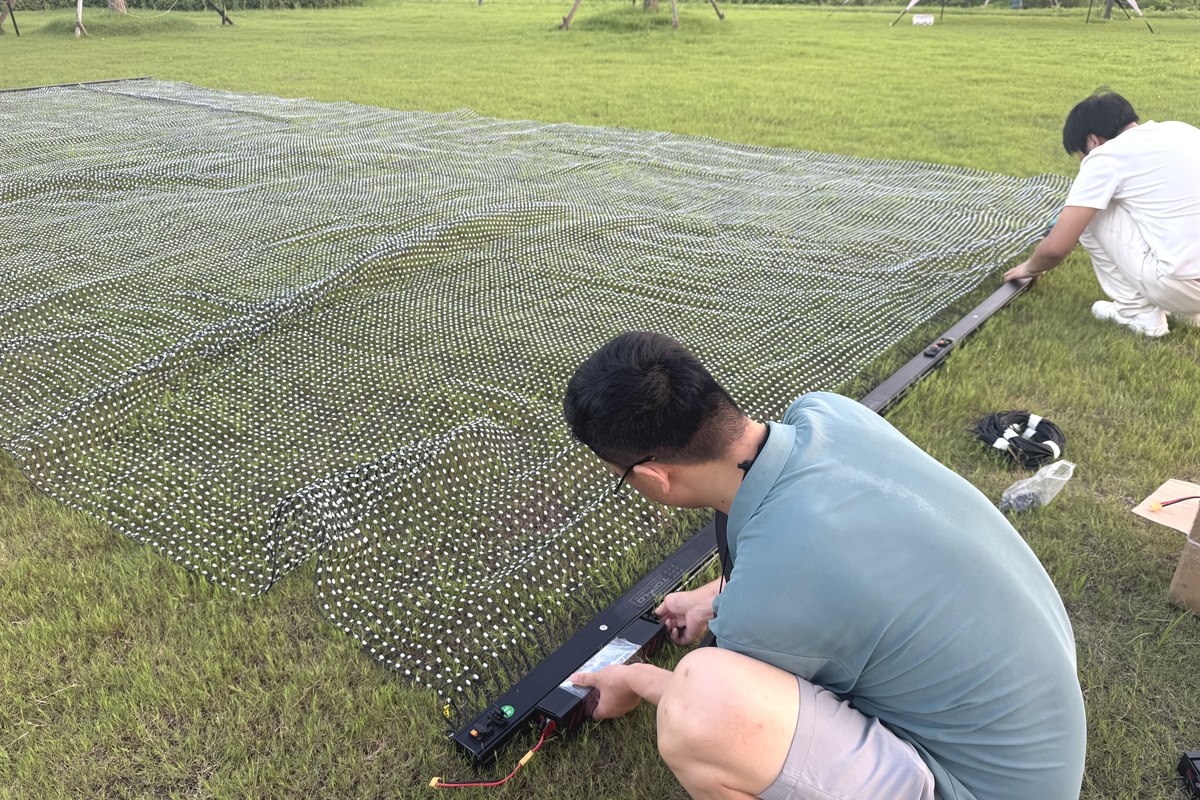
Step 1: ground preparation of the screen and external batteries.
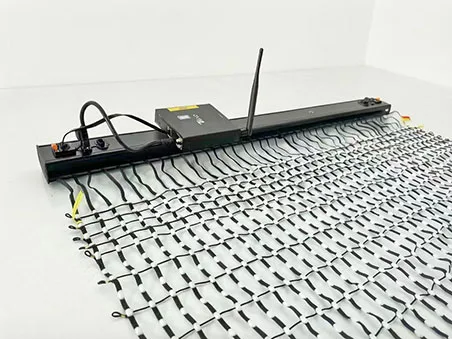
Steps 4 and 5: controller setup with the NovaStar TB10 Plus.
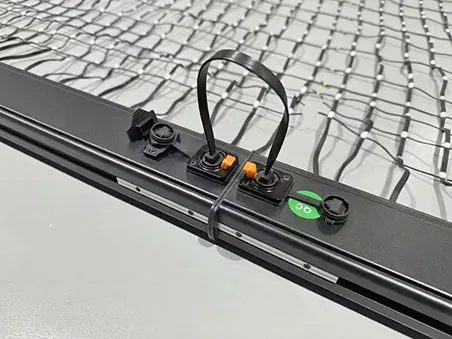
Step 5: data and power distribution box connection.
Step 7: suspension hardware and enclosure connector details.
Watch the 4 × 8 m assembly tutorial on Instagram for the process in action.
10. Drone Connection, Suspension Hardware and Payload Considerations
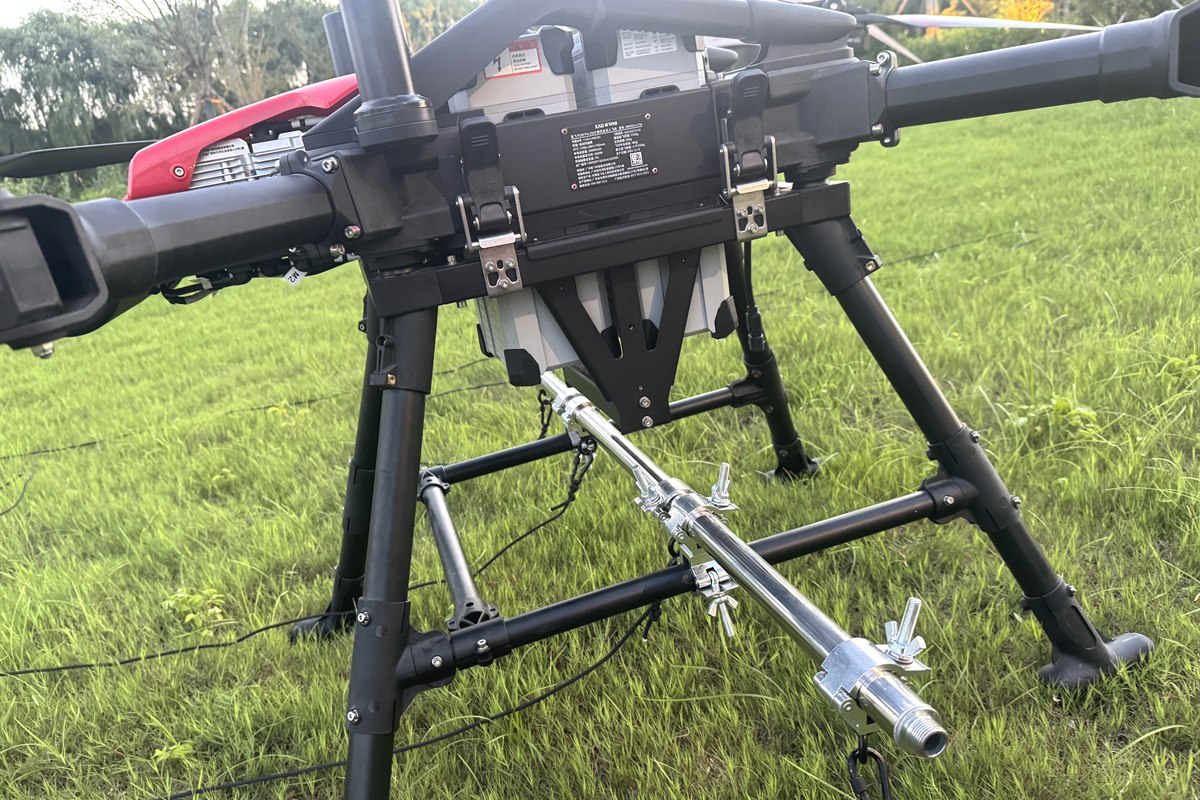
Connection hardware. Lifting ropes attach to one 1 m connection rod. The rod is fixed to the drone's landing gear tube with swivel clamps, available for 25–30 mm or 30–35 mm tube outer diameter. Measure the outer diameter where the clamp will sit and tell us when you order. Each clamp passed a 200 kg static test in our internal testing; that is a component test, not a drone lifting rating.
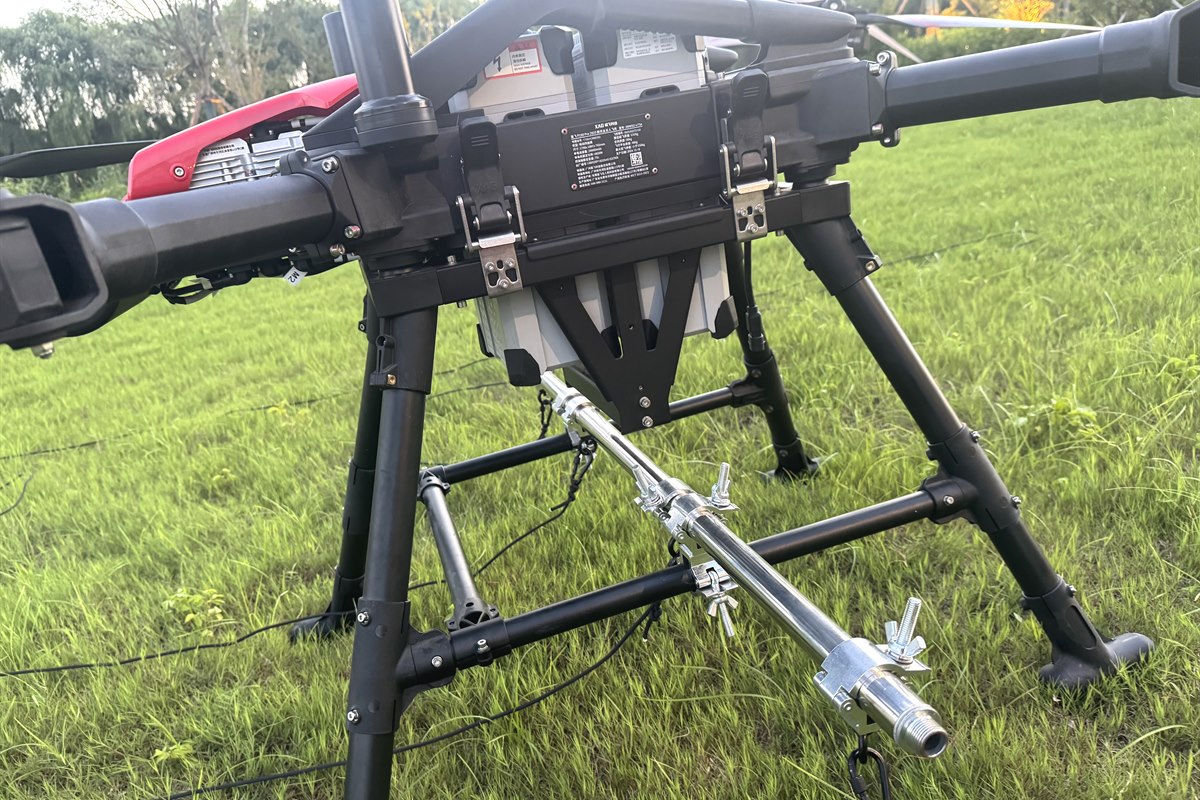
Drone mounting and support hardware.
Payload. The drone must carry the complete system, not just the mesh. Use the total weight column in the battery table, then add anything specific to your project (extra batteries, cabling or a custom rigging layout). Compare the result with the drone manufacturer's rated payload and a safety margin set by your qualified flight team.
Wind and weather. The 6 m/s figure in the specification table is the highest wind speed recorded in our tests. For safety we recommend not exceeding it, and the operator must also apply the drone's own wind and weather limits. Royal AD Tek's warranty does not cover losses from extreme weather such as thunderstorms or typhoons.
Responsibility. We recommend sourcing a suitable heavy-lift drone locally, so you have local technical support and meet regional aviation rules. Drone selection, the drone manufacturer's terms, flight permits and insurance are outside Royal AD Tek's responsibility. Compatibility with any specific drone model, including large agricultural-class platforms, must be verified project by project; we do not claim universal compatibility.
11. Content and Playback Management
The screen is driven by a NovaStar TB10 Plus media player with Wi-Fi app management. A few practical rules help results:
- Match the native resolution shown in the size table.
- Use dark backgrounds and high contrast. The mesh is open, so bold shapes read better than fine detail.
- Limit large white areas. They draw the most power and shorten runtime.
- Choose 16-bit grayscale for video with smooth gradients; 8-bit is available for projects that specify it.
- Keep motion moderate, because the screen moves with the drone.
- Test on the ground with the approved brightness before every flight.
12. Applications
- Aerial advertising: brand logos and short messages over crowds, beaches and city squares.
- Concerts and festivals: a moving visual element above a stage or audience.
- Sports events and ceremonies: sponsor messages, team logos and countdown graphics.
- Brand launches and corporate events: a temporary aerial presentation without a permanent structure.
- Tourism and cultural events: festival nights, anniversaries and seasonal celebrations.
- Drone light show projects: a flying screen adds a video surface to a show built around lights, instead of replacing swarm shows.
All uses are subject to local operating rules and permits.
13. Real Project Examples
- 5 × 10 m P25 flying LED screen performance in Jakarta, Indonesia: watch the video on Instagram.
- 5 × 10 m P25 case study in Ramat Gan, Israel: read the project case study.
- Three-screen New Year countdown show in China: read the project story, and see how three P25 screens play one video in sync.
- 300 m² record screen: the large-format flying LED mesh project.
- Correct takeoff position: video on Instagram showing how the screen and drone are positioned before a lift.

Large-format drone-suspended flying LED mesh project.
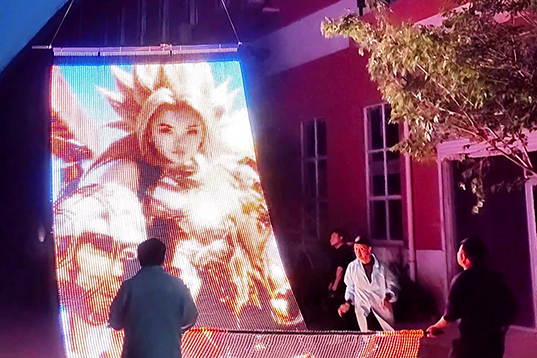
Outdoor evening demonstration of the illuminated mesh.

Video: Royal AD Tek flying LED screen drone demonstration (YouTube).
14. Advantages of Factory-Backed Customisation
Royal AD Tek is the outward-facing brand, and Fushilong is the manufacturing identity behind the product. Working directly with the factory means the screen, battery configuration and kit can be specified together. What can be customised:
- Size: P25 screens up to 12.5 m high, with unlimited width.
- Battery option: built-in 21700, external 18650, or a two-packs-per-metre layout for long-hover projects.
- Clamps and ropes: 25–30 mm or 30–35 mm clamps, and rope lengths matched to screen height.
- Support: 40 spare LEDs per screen, a replacement video and manual, and a 2-year warranty on the screen (batteries, controller and media player excluded; damage from forceful pulling or rough handling is not covered).

Factory quality inspection before delivery.
15. How to Choose Screen Dimensions and Battery Configuration
| If your priority is... | Consider |
|---|---|
| A lighter payload | A smaller screen and the built-in 21700 battery |
| Longer hover time | The external 18650 option, or two packs per metre (discuss with us) |
| Strong impact at long distance | A larger screen, checked against drone payload and wind limits |
| Smooth gradients in video | 16-bit grayscale |
| Fast setup | The integrated controller design (standard) |
A simple selection process:
- Define the audience position and viewing distance.
- Find your drone's rated payload and subtract a safety margin.
- Choose the largest screen whose total weight fits that limit.
- Pick the battery option for your target flight time.
- Plan the content for the brightness setting that screen can run.
- Check wind and temperature limits for the event date.
16. Frequently Asked Questions
What is a drone flying LED screen? It is a lightweight, open-mesh LED display designed to be suspended beneath a suitable heavy-lift drone for aerial events and advertising.
How long can a P25 flying LED screen run? The reference runtime is about 60 minutes with the built-in battery and about 80 minutes with the external battery, at the brightness set for each size. Content with large white areas shortens it.
How much does it weigh? The screen body is 0.75 kg/m². Total system weight ranges from 7 kg for 1 × 4 m to 64.63 kg for 5 × 12.5 m with the built-in battery.
Can I use any drone? No. The drone's rated payload, attachment points and local regulations must be verified. We do not claim universal compatibility.
Is the screen waterproof? The ingress protection rating is IP65. Operating conditions still follow the limits in this guide, and the warranty excludes losses from extreme weather.
What is the warranty? Two years for the screen. Batteries, controller and media player are excluded.
More answers are in our P25 technical and purchasing FAQ.
17. Project Inquiry Checklist and Next Step
To receive a recommendation, send:
- Required screen size (width × height) and pixel pitch
- Viewing distance and audience position
- Drone model, rated payload and landing gear tube outer diameter
- Target flight time and battery preference
- Event location, date and expected weather
- Destination country
Request a project-specific recommendation on the P25 drone flying LED screen mesh product page, or email info@royaladtek.com.